Properties panel
The right sidebar (264px wide on desktop) shows properties and is toggled with ⌘/. On desktop, it animates width with a 200ms ease-out transition for smooth canvas resize. On mobile, it slides in as a drawer overlay (max 85vw) with a close button.
Formal definition
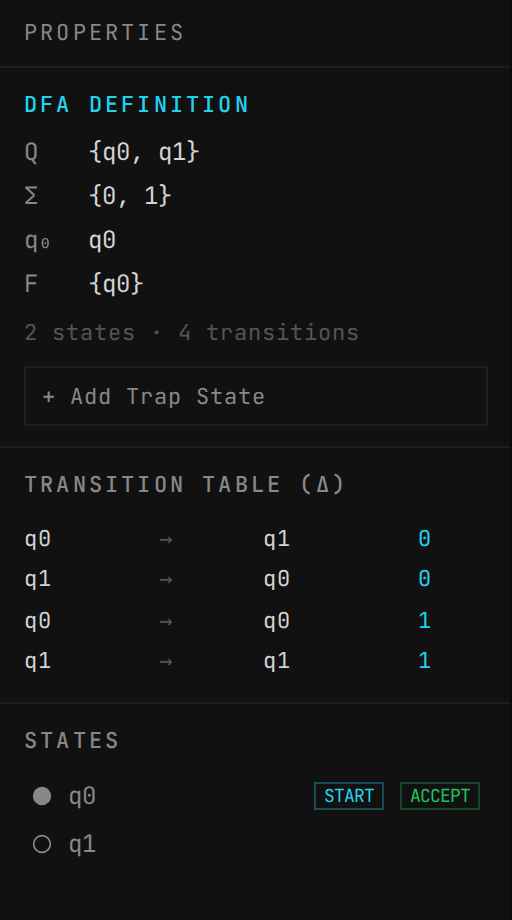
Shows the standard tuple definition of the current automaton, adapting to the current mode:
→ Q — Set of states: {q0, q1, q2} or ∅ if empty
→ Σ — Input alphabet: extracted from all transition symbols (excluding ε), sorted alphabetically
→ q₀ — Initial state label, or "—" if none set
→ F — Set of accepting states, or ∅ if none
→ Summary: "N states · M transitions"
Transition table (δ)
A compact table listing every transition. Each row shows:
→ From state → To state, with symbols in accent color
→ Click any row to select that transition on the canvas (highlights the edge)
→ The currently selected transition is shown in accent color
Selected state/transition
When a state is selected, the panel shows:
→ State label in accent color
→ Checkboxes for Initial and Accepting (clickable to toggle)
→ "Rename…" link to open the inline editor
When a transition is selected:
→ From → To states shown with an arrow
→ Current symbols in accent color
→ "Edit symbols…" link to open the inline editor
Trap state
For DFA/NFA modes, a "+ Add Trap State" button appears when there are states. This automatically:
→ Collects the alphabet from all existing transitions
→ Finds all (state, symbol) pairs that have no outgoing transition
→ Creates a non-accepting state labeled "trap" positioned 150px to the right of the rightmost state
→ Adds transitions from each state to the trap for all missing symbols
→ Adds self-loops on the trap for every alphabet symbol
→ If no transitions are missing (DFA is already complete), does nothing
→ Also available via ⇧⌘Q
DFA validation errors
In DFA mode, the panel shows an "Errors" section in red for any violations:
→ "Multiple initial states" — if more than one state has isInitial=true
→ "ε-transition from qN" — for each state that has an epsilon transition
→ "qN: multiple on 'a'" — for each state that has multiple transitions on the same symbol (nondeterminism)
States list
At the bottom, a scrollable list of all states. Each shows: a circle icon (filled if accepting), the label, a "START" badge for initial states, and an "ACCEPT" badge for accepting states. Click any state to select it on the canvas.
Mobile actions
On mobile, the sidebar includes action buttons not available in the compact toolbar: SHARE, LAYOUT, CLEAR, EXPORT, and IMPORT. These mirror the desktop toolbar functionality.