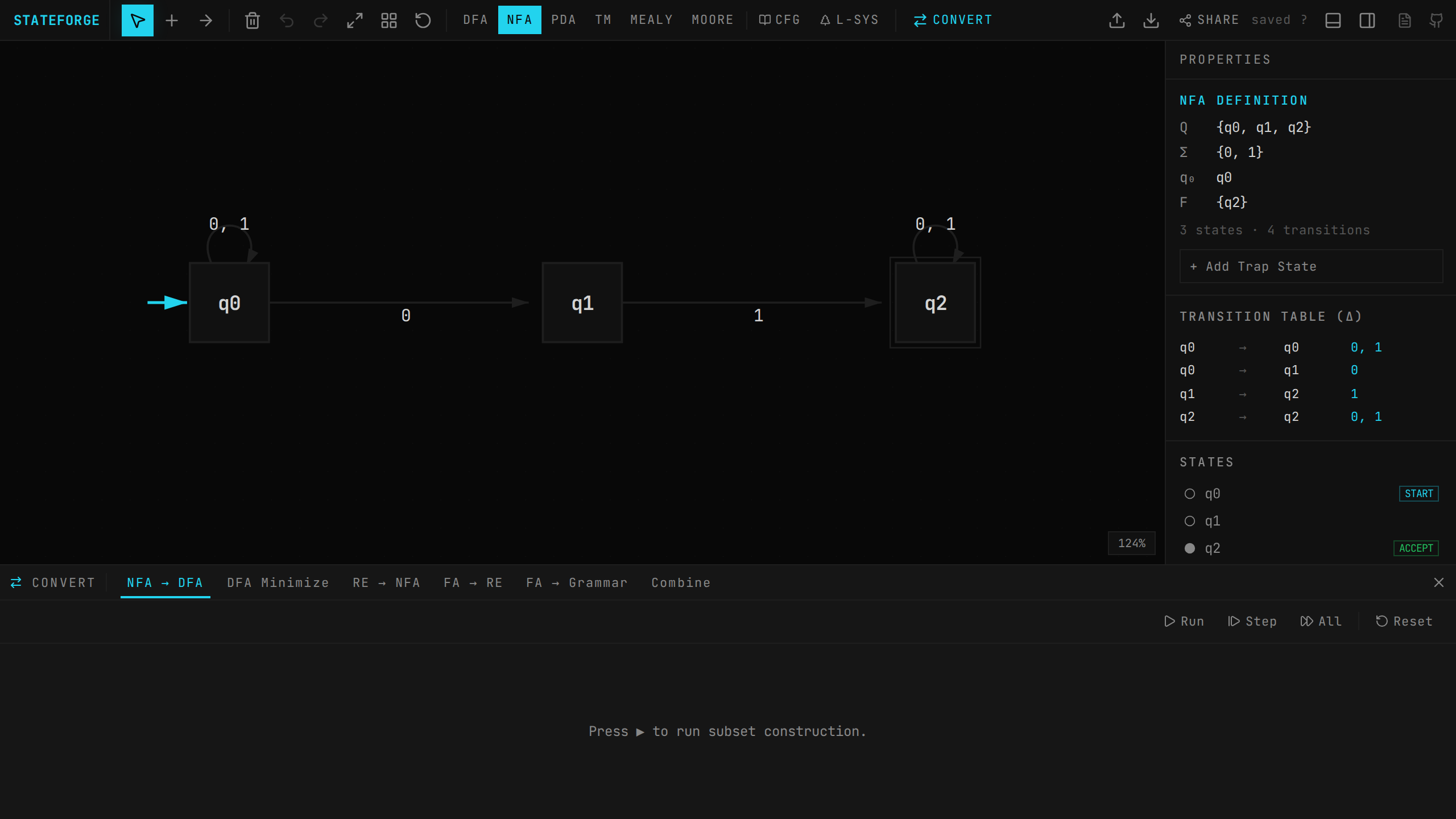
Conversions
Open the conversions panel with ⌘M or the CONVERT button in the toolbar. The panel has 6 tabs, each with its own step-through interface. All conversions support: ▶ Run (compute full result), ⏩ Step (advance one step), ⏭ Fast Forward (show all steps), and ↺ Reset.
NFA → DFA (subset construction)
Converts the current NFA to an equivalent DFA using the standard subset construction algorithm. Requires the automaton to be in NFA mode.
→ Algorithm: BFS starting from the ε-closure of the initial state. For each unprocessed subset and each alphabet symbol, compute the move set (states reachable on that symbol from any state in the subset) and take its ε-closure to get the resulting DFA state.
→ Step display: Each step shows δ(subset, symbol) = result, with "NEW" flagged for newly discovered subsets
→ State labels: DFA states are labeled with the set notation of their constituent NFA states, e.g., {q0,q1}
→ Accepting: A DFA state is accepting if any of its constituent NFA states is accepting
→ Dead states: Empty move sets (no reachable states) are skipped rather than creating a trap state
→ Apply: Click APPLY to replace the canvas automaton with the resulting DFA (switches mode to DFA)
→ Layout: Result states are arranged in a circle with radius proportional to count
DFA minimization (table-filling)
Minimizes the current DFA using the table-filling (Myhill-Nerode) algorithm. Requires DFA mode.
→ Step 1 — Reachability: First removes unreachable states via BFS from the initial state
→ Step 2 — Base case: All (accepting, non-accepting) pairs are marked as distinguishable (round 0)
→ Step 3 — Refinement: Iteratively: for each unmarked pair (p, q), if δ(p, a) and δ(q, a) are distinguishable for any symbol a, mark (p, q) as distinguishable. Repeat until no changes.
→ Step 4 — Merge: Unmarked pairs are equivalent. Uses Union-Find to merge equivalent states (prefers initial state as representative).
→ Step display: Each step shows: ✗ (stateA, stateB) with the reason (e.g., "On 'a': q0→q1, q2→q3 (distinguishable)")
→ Result: Reports how many states were removed. If already minimal, shows "DFA is already minimal!"
RE → NFA (Thompson's construction)
Enter a regular expression and convert it to an NFA using Thompson's construction.
→ Supported syntax: Literals (a-z, 0-9, any non-special character), | (union), * (Kleene star), + (one or more), ? (optional), () groups, ε or ϵ (epsilon), and \ for escaping special characters
→ Parser: Recursive descent with precedence: union < concatenation < Kleene/quantifiers < atoms
→ Construction: Each operation creates a fragment (start state, end state, internal transitions). Concatenation merges end/start states; union adds new start/end with ε-transitions to both branches; star adds ε-loops.
→ Step display: Each step describes the fragment built: "Symbol 'a': q0 → q1", "Union: q4 → (q0|q2) → q5", "Star(*): q6 → q0...q3 → q7"
→ Error handling: Parse errors are displayed in red (e.g., "Unexpected character at position 5")
FA → RE (state elimination)
Converts the current finite automaton to a regular expression using the GNFA state elimination method.
→ GNFA setup: Adds a new start state (with ε to original initial) and a new accept state (ε from all original accepting states). Transitions are stored as regex edge labels.
→ Elimination: Each original state is eliminated one by one. For every pair (p, q) where p→eliminated and eliminated→q exist, a new edge p→q is created with label: R_in · R_self* · R_out (where R_self is the self-loop if it exists).
→ Step display: Each step shows which state was eliminated and how many edges were updated
→ Result: The final regex is the label on the edge from GNFA start to GNFA accept. A COPY RE button copies it to clipboard. Basic simplification removes redundant ε concatenations.
FA → grammar
Generates a right-linear grammar from the current finite automaton.
→ Non-terminal mapping: The initial state maps to S; other states map to A, B, C, ... (or their label uppercased if single-char)
→ Production rules: For each transition from→to on symbol: Head → symbol Body. For ε-transitions: Head → Body.
→ Accepting states: For each accepting state, add Head → ε
→ Output: Productions displayed with start symbol indicated. COPY GRAMMAR button copies in standard notation.
Combine (DFA operations)
Combine the canvas DFA (automaton A) with a second automaton B (specified as a regular expression). Requires DFA mode.
→ ∪ Union — accepts strings in A or B. Accepting condition: accept_A OR accept_B.
→ ∩ Intersection — accepts strings in both A and B. Accepting condition: accept_A AND accept_B.
→ − Difference — accepts strings in A but not B. Accepting condition: accept_A AND NOT accept_B.
→ ¬ Complement — flips accepting states of A (only A needed, ignores B). Both DFAs are first completed with a trap state for missing transitions.
→ Product construction: For binary ops, B is built from the RE input via RE→NFA→DFA pipeline. Then BFS explores product states (stateA, stateB), computing transitions for each alphabet symbol.
→ DFA completion: Before product construction, both DFAs are automatically completed by adding a trap state (labeled ∅) with self-loops for all missing (state, symbol) pairs.
→ Step display: Each step shows δ(pair, symbol) = result, with NEW flags for newly discovered product states
Auto-play and step-through controls
All conversion tabs share a common set of playback controls:
→ Auto-play: Click the play button (▶) to automatically advance through steps at a configurable speed. Click pause (⏸) to stop.
→ Speed slider: Adjust the step interval from fast (100ms) to slow (1500ms). The slider is in the conversion panel header next to the playback controls.
→ Canvas highlighting: During step-through, the relevant states on the main canvas are highlighted in accent color so you can see which parts of the automaton each step affects.
→ Step label banner: A banner below the panel header shows a description of the current step in accent-colored monospace text (e.g., "δ({q0,q1}, a) = {q2}").
→ Controls: ▶ Run (compute all), ⏩ Step (advance one), ⏭ Fast Forward (show all steps), ↺ Reset, ▶/⏸ Auto-play toggle.