Deterministic Finite Automaton (DFA)
Theory
What is a DFA?
A Deterministic Finite Automaton is one of the simplest models of computation. It reads an input string one symbol at a time, moving between a finite set of states according to fixed rules, and ultimately accepts or rejects the string.
The key word is deterministic: for every state and input symbol, there is exactly one next state. No ambiguity, no choices, no backtracking.
Formal definition
A DFA is defined as a 5-tuple (Q, Σ, δ, q₀, F):
| Component | Meaning | Example |
|---|---|---|
| Q | Finite set of states | {q₀, q₁, q₂} |
| Σ | Input alphabet (finite set of symbols) | {a, b} |
| δ | Transition function: Q × Σ → Q | δ(q₀, a) = q₁ |
| q₀ | Initial (start) state, q₀ ∈ Q | q₀ |
| F | Set of accepting (final) states, F ⊆ Q | {q₂} |
The transition function δ is total, meaning it must be defined for every (state, symbol) pair. If you have 3 states and 2 symbols, you need exactly 6 transitions defined.
How it works
- →The DFA starts in the initial state q₀
- →It reads the input string left-to-right, one symbol at a time
- →For each symbol, it follows the transition δ(current_state, symbol) to the next state
- →After reading the entire string, if the current state is in F → accept; otherwise → reject
Example: A DFA that accepts strings over {a, b} containing an even number of as:
States: {even, odd}     (even = q₀, start & accepting)
Alphabet: {a, b}

δ(even, a) = odd        δ(even, b) = even
δ(odd,  a) = even       δ(odd,  b) = odd

Input "abba":  even →a→ odd →b→ odd →b→ odd →a→ even  ✓ Accept
Input "ab":    even →a→ odd →b→ odd                     ✗ Reject
DFA vs NFA: determinism explained
In a Nondeterministic Finite Automaton (NFA):
- →A state can have multiple transitions on the same symbol (or none at all)
- →ε-transitions (moving without reading input) are allowed
- →The NFA accepts if any possible path leads to an accepting state
In a DFA:
- →Exactly one transition per (state, symbol) pair, no ambiguity
- →No ε-transitions allowed
- →The single computation path determines acceptance
Despite the NFA's apparent flexibility, DFAs and NFAs are equivalent in power: they recognize exactly the same class of languages (regular languages). Any NFA can be converted to a DFA via the subset construction algorithm, though the DFA may have exponentially more states.
Language recognition
The language of a DFA M, written L(M), is the set of all strings it accepts:
L(M) = { w ∈ Σ* | δ*(q₀, w) ∈ F }
where δ* extends δ to strings (processing one symbol at a time). A string is accepted if processing it from q₀ lands in an accepting state; otherwise it is rejected. Every string gets a definitive answer; there's no "maybe."
Practical applications
- →Lexical analysis: compilers use DFAs to tokenize source code (recognizing keywords, identifiers, numbers)
- →Pattern matching: regular expressions compile to DFAs for fast string searching
- →Protocol verification: network protocols modeled as DFAs to verify correct message sequences
- →Hardware design: digital circuits implement DFAs for control logic
- →Text processing: grep, sed, and similar tools use DFA-based engines
Key properties
Closure properties. Regular languages (those recognized by DFAs) are closed under:
- →Union: L₁ ∪ L₂ is regular if L₁ and L₂ are regular
- →Intersection: L₁ ∩ L₂ is regular
- →Complement: Σ* \ L is regular (just flip accepting/non-accepting states)
- →Concatenation and Kleene star
Equivalence with NFA. Every NFA can be converted to an equivalent DFA using subset construction. Each DFA state represents a set of NFA states.
Minimization. For every DFA, there exists a unique (up to renaming) minimal DFA recognizing the same language, with the fewest possible states. This can be computed efficiently using the table-filling algorithm.
Limitations
DFAs can only recognize regular languages. They cannot count: any language requiring unbounded memory is beyond their reach.
Pumping Lemma intuition: Since a DFA has finitely many states, any sufficiently long input must revisit a state (pigeonhole principle). The loop between repeated visits can be "pumped" (repeated any number of times), and the string must still be accepted. This means:
- →❌
{aⁿbⁿ | n ≥ 0}(cannot match equal counts of a's and b's) - →❌ Balanced parentheses
- →❌
{ww | w ∈ Σ*}(cannot detect repeated halves) - →✅
{w | w contains "abc"}(fixed pattern matching) - →✅
{w | |w| is divisible by 3}(finite counting mod)
For anything beyond regular languages, you need pushdown automata or Turing machines.
Using DFA in StateForge
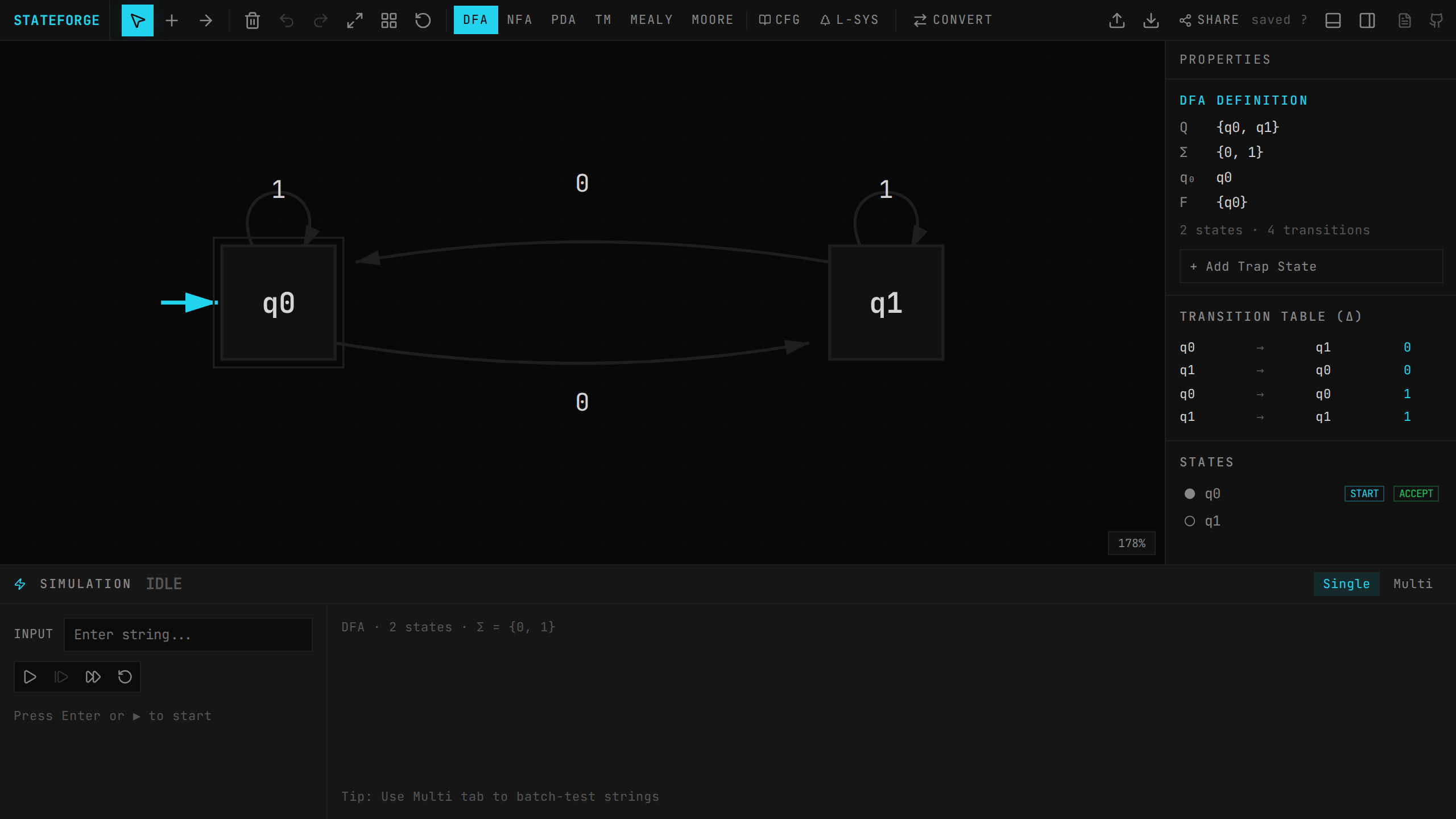
Switching to DFA mode
DFA is the default mode when you open StateForge. You can switch to it anytime:
- →Press 1 on your keyboard
- →Or click the DFA tab in the top toolbar
Building a DFA
Adding states
- →Double-click on the canvas to create a new state
- →Or select the S tool from the toolbar and click anywhere on the canvas
- →States are labeled automatically (q₀, q₁, q₂, …)
Setting state properties
Right-click a state to access its context menu:
- →Set as Initial: marks the state as the start state (shown with an arrow)
- →Set as Accepting: marks the state as an accepting/final state (shown with a double circle)
Adding transitions
- →Select the T tool from the toolbar
- →Click a source state, then click the destination state
- →A transition is created with the default symbol
a - →Click the transition label to edit; you can change the symbol or add multiple symbols separated by commas
- →Self-loops: click a state and then click it again
DFA validation
The Properties panel in the sidebar automatically validates your DFA and shows errors:
| Error | Meaning |
|---|---|
| Multiple initial states | A DFA must have exactly one start state |
| ε-transition from qₙ | DFAs do not allow epsilon transitions |
| qₙ: multiple on 'x' | State qₙ has more than one transition on symbol x |
Fix all validation errors to ensure your automaton is a valid DFA.
Simulation
StateForge provides two simulation modes for testing your DFA.
Single run
- →Enter an input string in the simulation input field
- →Start (Enter): begins the simulation, highlighting the initial state
- →Step (Enter): advances one symbol at a time, showing the current state and consumed input
- →Fast Run: processes the entire remaining input at once
- →Reset: clears the simulation
The simulation panel shows:
- →The input string with the current position highlighted
- →The current active state(s) highlighted on the canvas
- →Active transition labels during stepping
- →Final result: Accepted (landed on accepting state) or Rejected
Multi-run (batch testing)
- →Click the Multi tab in the simulation panel
- →Enter multiple test strings, one per line
- →Click RUN ALL
- →Results show each string with ✓ (accepted) or ✗ (rejected)
- →A summary shows how many passed (e.g., "3/5 pass")
This is ideal for verifying your DFA against a suite of test cases.
Trap state (dead state)
A valid DFA requires transitions for every (state, symbol) pair. In practice, many transitions lead to a non-accepting "trap" or "dead" state from which there is no escape.
Click + Add Trap State in the sidebar to automatically:
- →Create a trap state (non-accepting, with self-loops on all symbols)
- →Add missing transitions from existing states to the trap state
This ensures your DFA's transition function is total. The trap state button is available in both DFA and NFA modes.
Conversions
From DFA
| Conversion | Description |
|---|---|
| Minimize | Reduces the DFA to its minimal equivalent using the table-filling algorithm. Shows how many states were removed. |
| FA → RE | Converts the finite automaton to an equivalent regular expression using state elimination. |
| FA → Grammar | Converts to an equivalent right-linear (regular) grammar. |
| Combine | Product construction with another automaton. Supports union, intersection, difference, and complement. |
To DFA
| Conversion | Description |
|---|---|
| NFA → DFA | Subset construction — converts an NFA to an equivalent DFA. Each DFA state represents a set of NFA states. Shows step-by-step construction. |
For combine operations, you'll import or define a second automaton. Complement only requires the current DFA: it completes the DFA (adds trap state if needed) and flips all accepting/non-accepting states.
Tips & common mistakes
Forgetting the trap state
A DFA's transition function must be total: every state needs a transition for every symbol in the alphabet. If your DFA is missing transitions, it's technically incomplete.
Fix: Click + Add Trap State in the sidebar to auto-generate missing transitions to a dead state.
Multiple initial states
A DFA has exactly one initial state. If you accidentally mark multiple states as initial, the properties panel will flag this error.
Fix: Right-click the extra initial states and deselect "Initial."
Using ε-transitions
Epsilon (ε) transitions are an NFA feature and are not allowed in a DFA. If you add one, the validator will report an error.
Fix: Remove the ε-transition, or switch to NFA mode (2) if your design requires it. You can then convert NFA → DFA using subset construction.
Duplicate transitions on the same symbol
If state q₁ has two different transitions on symbol a (going to different states), the automaton is nondeterministic, not a valid DFA.
Fix: Remove the duplicate transition. If you need nondeterminism, use NFA mode and convert to DFA afterward.
General tips
- →Start simple. Sketch the DFA on paper first, identifying what each state "remembers."
- →Think in terms of state meaning. Label states by what property they track (e.g., "seen odd number of a's").
- →Test with edge cases. Use multi-run to test the empty string (ε), single characters, and boundary inputs.
- →Minimize after building. Use the minimize conversion to clean up redundant states.
- →Use complement for "not" languages. If it's easier to build a DFA for the opposite language, build that and complement it.